The need for Depth emerged from a practical frustration. While designing a product website that relied on 3D imagery, the creator found themselves caught in a cumbersome workflow: leaving Figma, setting up scenes in Blender or Cinema 4D, exporting renders, and returning to the canvas. A dedicated visualization team handled the final images, but the iteration cycle between designer and leadership reviews every two weeks demanded faster feedback loops.
What was missing was a lightweight tool that could load arbitrary 3D models and provide enough visual information to judge composition and form without requiring production-quality materials or professional lighting setups. Depth was conceived to fill that gap: load a model, adjust the camera and lighting, place a render on the canvas, and keep designing.
Building the MVP
Development began with a narrow proof of concept focused on the core workflow. The initial version could load a model, move the camera, change the light, and return an image to Figma. The priority was testing two things: whether the scene would remain responsive inside the plugin window, and how much 3D control could fit without making the interface feel foreign to someone working primarily in Figma.
Once the MVP demonstrated the desired performance and rendering quality, work expanded to nice-to-have features and the overall plugin experience. The architecture splits into two parts: Three.js handles the 3D model, camera, materials, and lighting inside the plugin window, while a separate controller manages the Figma document. When a user selects a frame, the controller sends it to the 3D scene as a PNG. After rendering completes, the image returns to Figma as a standard image layer. A 2x export option doubles the PNG's dimensions while keeping the layer at its intended size, producing sharper results without altering composition.
The interface borrows Figma's inspector pattern on the right side and adopts camera, viewport, and timeline conventions familiar from Cinema 4D and 3ds Max. During camera movement, rendering temporarily reduces quality, then restores full shadows and clean edges for the final image placed in Figma. When models include transparent or translucent materials, Depth includes the scene background in the export to preserve convincing reflections and refractions.
Designing the Website
The website for Depth was structured to show what the plugin does by walking visitors through the order in which a render takes shape. The experience begins almost entirely dark and introduces information one layer at a time. A single object remains visible as variables change, making the effect of each decision clear to follow.
The Opening Scene
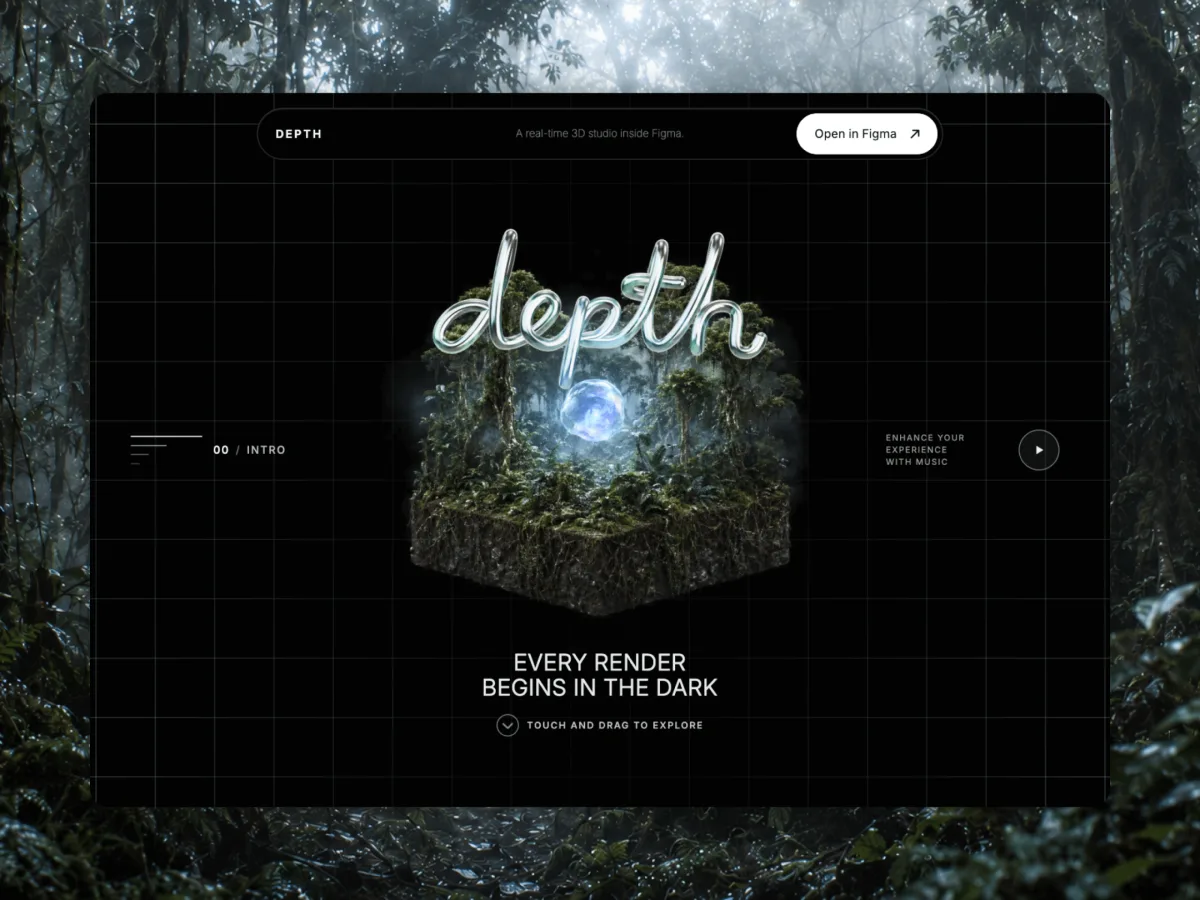
The hero section needed to feel cinematic while giving visitors some control. It introduces the site's visual language before the Form, Material, and Environment sections begin, so image quality here carried more weight than elsewhere on the page.
The first approach used a live 3D model—the most direct extension of Depth itself. Different textures and HDRIs were tested, but the materials and lighting never reached the desired visual quality. The scene functioned correctly but read as an interactive 3D experiment rather than a polished image.
The solution was to generate two frames and use Seedance 2.0 to create a 360-degree turn between them. This motion became a 240-frame sequence controlled by the horizontal position of the mouse pointer, so moving across the page rotates the island directly instead of playing a fixed video. This approach allowed frame-by-frame control of composition, surface detail, and atmosphere while preserving a simple physical response.
The finished hero combines real-time 3D elements around the sequence. Those layers provide depth and immediate movement, while the island maintains the image quality that the fully live version could not achieve. The handwritten DEPTH title sits within the same composition, creating the impression of a single 3D scene even though the central image is controlled media.
The hybrid approach carries a media cost, so the first frame cannot depend on the full sequence being ready. The page renders a poster first, maintains separate landscape and portrait media, and loads heavier elements later.
Form and Material
As the page transitions from Form into Material, the same object remains in place. When visitors apply different materials, the new surface takes approximately 2 seconds to travel across the object. The control responds immediately; only the surface animation takes time. The transition runs inside one opaque Three.js material, blending colour, roughness, metallic response, surface detail, and reflections before lighting is applied. Three.js continues to treat it as a single solid object, so edges and depth remain stable while the visitor rotates it. If someone changes their mind mid-transition, selecting the starting material sends the sweep back from its current position. Choosing a third option clears the active change quickly, then begins the latest selection.
Environment
The next chapter expands the scene. The object remains with its chosen surface, and the visitor can rotate the environment around it. The goal was to include reflections from a photographic world without placing that photograph behind the object, where clouds, snow, and a horizon would clutter the black space and make the page resemble a conventional 3D viewport.
The solution splits the task in two. An HDRI—a panoramic image wrapped around a 3D scene to supply light and reflections—remains invisible. The mountain that visitors actually see is a separate layer, sampled from real terrain and rendered as a sparse field of points. Its ridges and elevation changes derive from the model, but the dotted texture keeps it aligned with the site's overall visual language.
Render
The final section demonstrates how a render from Depth integrates into a real design workflow. After adjusting the scene, the visitor places the object inside a fictional store of abstract figures, transforming an isolated render into part of a finished website. In the catalogue, each figure is presented as a combination of form, material, and light—the same decisions the visitor has just explored.
Depth is available at depth.fyi and can be opened directly in Figma.
Source: Codrops